Introduction: More Than a Licensing Update
When Microsoft announced Copilot, the loudest conversation wasn’t about features…it was about price. Too expensive. Unclear ROI. Not worth it yet. I’ve said it before: stop focusing on the cost of the shovel when you’re digging for buried treasure. If the ground is packed with gold, the shovel is the least of your worries.
Now with Microsoft’s shift to Copilot Credits, the equation just tilted further in your favor. Notice in Table 1 below we have some language change. No more messages. Say hello to Copilot Credits. While this might be viewed as semantics, its not. Get excited! This is a huge step in AI unification within the Microsoft Ecoverse and will support a more organized token economy. Meaning everyone’s life is a bit more simplified.
| Copilot Studio feature | Billing rate | Use in Microsoft 365 Copilot scenarios1 | Autonomous triggers2 |
|---|---|---|---|
| Classic answer | 1 Copilot Credit | No charge | N/A |
| Generative answer | 2 Copilot Credits | No charge | 2 Copilot Credits |
| Agent action | 5 Copilot Credits | No charge | 5 Copilot Credits |
| Tenant graph grounding for messages | 10 Copilot Credits | No charge | 10 Copilot Credits |
| Agent flow actions per 100 actions | 13 Copilot Credits | No charge | 13 Copilot Credits |
| AI tools | |||
| – Text and generative AI tools (basic) per 10 response | 1 Copilot Credit | No charge | 1 Copilot Credit |
| – Text and generative AI tools (standard) per 10 response | 15 Copilot Credits | No charge | 15 Copilot Credits |
| – Text and generative AI tools (premium) per 10 response | 100 Copilot Credits | No charge | 100 Copilot Credits |
What Changed?
Interactive use of classic answers, generative answers, tenant graph grounding, and agent actions inside Microsoft 365 apps are now included at no extra cost for every licensed Copilot for Microsoft 365 user. For autonomous agents we have a clear path. I would suspect that some of these may become seeded within Power Automate Premium or Process licenses at some point. Throwing gasoline on the fire.
But the bottom line: if you already have Copilot for Microsoft 365, you just got a serious upgrade without paying a dime more.
However this shift isn’t just about reducing costs. It’s about unlocking new kinds of value for both individual users and organizations. To make the impact clear, let’s break it down side by side in Table 1.1 below.
| Value to the User | Value to the Business |
|---|---|
| Copilot for M365 becomes less turnkey as interactive use of generative answers are seeded | More predictable usage costs with “less” need to monitor credit burn down |
| Graph grounding for richer, context-aware results in everyday apps means a happier user | Realize greater ROI on tenant data since grounded answers are now included by default |
| More than knowledge as the user can trigger agent actions directly inside Microsoft Apps | Reduction of strain on operations, IT, and budget as this enables more process optimization at scale without requiring new licenses or tools |
| Experiment and explore Copilot more freely now that the “meter” isn’t running | Drive broader adoption and cultural change by lowering barriers to experimentation |
What’s Not Included
Before we throw confetti, let’s be clear about what this update doesn’t solve:
- Agent governance: Without guardrails, agents create chaos. Governance still matters. (Microsoft’s guidance is a good starting point). Core tools like the Microsoft Power Platform Center of Excellence (CoE) Starter Kit and the Copilot Studio Kit are essential.
- Training: Low-code doesn’t mean no learning curve. Without enablement, adoption stalls. Use partners and use Microsoft Training
- Adoption strategy: AI is still new. Users need champions, success stories, and structure to thrive. Let’s chat!
- The rest of the Microsoft 365 ecosystem: If users struggle with Teams, SharePoint, or Outlook, Copilot can’t fix that. Don’t put the carriage before the horse.
Strategy: Turning Credits Into Currency
Here’s how to turn this licensing update into real business value:
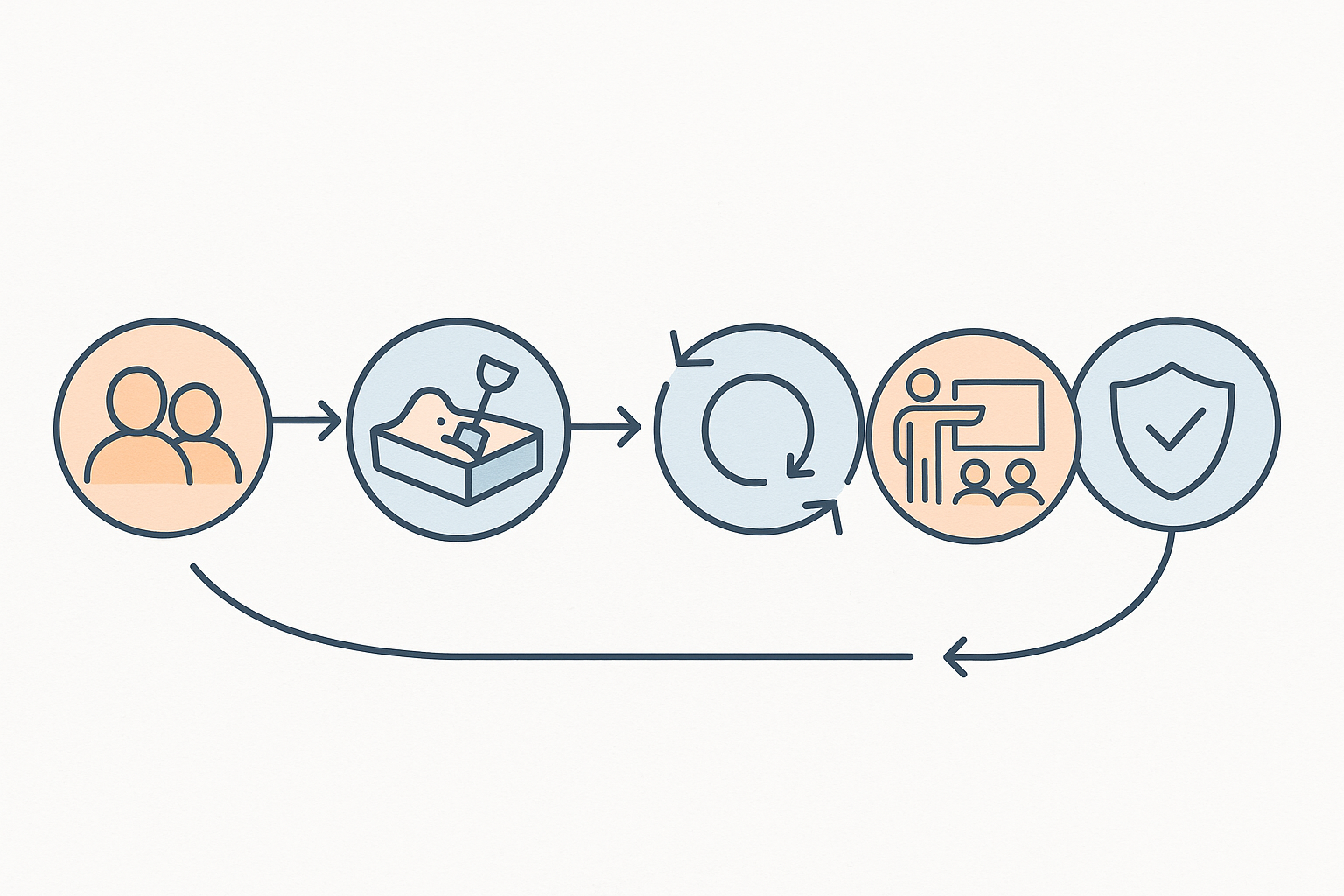
1. Understand Your People and Culture
Where does value live today? What are our unique use cases/needs? Who are the early adopters? What’s your data maturity? What’s the organizations AI literacy?
2. Provide a Safe Playground
Create an environment where users can experiment, ideate, and even break things—without breaking production.
3. Close the Feedback Loops
Measure more than usage. Track value delivered, gaps uncovered, and lessons learned.
4. Invest in Training and Champions
Build a community of practice and run office hours. Train users on both Copilot features and core M365 skills.
5. Govern Like You Mean It
Establish policies, approval flows, and guardrails. Freedom without governance is just chaos in disguise.
When are you done? You are going to hate me now… NEVER. BUT as you practice and reiterate the value becomes exponential. So as outlined in Image 1: People & Culture → Safe Playground → Feedback Loops → Training & Champions → Governance → back to People & Culture
A Final Word
Many will glance at this change and say, “Cool, more stuff included.” But this is more than a licensing tweak. It’s Microsoft signaling that AI is becoming as universal as email or cell phones. It will happen, and sooner than you think. Some would argue, it already has.
Access isn’t the differentiator anymore. Strategy is.
So stop debating the cost of the shovel. We’re standing on top of buried treasure. The question is: do you have a map to dig in the right spot?
You know I am going to say it. Until Next time, Get Automating!